

How to download your Minecraft Server world
How to Download Your Minecraft Server World (Java and Bedrock)
Section titled “How to Download Your Minecraft Server World (Java and Bedrock)”You can download your Minecraft server’s world to keep a local backup, or to play it in singleplayer. This guide works for both Java Edition and Bedrock Edition servers. The download steps are the same, but where your world is stored and how you open it afterwards are different.
Before You Begin
Section titled “Before You Begin”- Access to the AleForge Panel
- Enough free space on your computer for the world files
- To know whether your server is Java or Bedrock
Tip: For the most reliable backup, stop your server before downloading the world. This stops the world files from changing while you copy them.
Java vs Bedrock at a Glance
Section titled “Java vs Bedrock at a Glance”| Java Edition | Bedrock Edition | |
|---|---|---|
| World folder name | world by default |
Named after your level-name setting |
| Where it is stored | In the main server folder | In the worlds folder |
| Nether and End | Separate folders on Paper and Spigot (for example world_nether, world_the_end) |
Inside the same world folder |
| How to open it in singleplayer | Copy the folder into your saves folder |
Import it as a .mcworld file |
Step 1: Find Your World
Section titled “Step 1: Find Your World”Java Edition
Section titled “Java Edition”Your world is a folder in the main server folder. By default it is named world, but it may be different if you changed the world name. You can check the name in the level-name setting in server.properties.
Bedrock Edition
Section titled “Bedrock Edition”Your world is a folder inside the worlds folder. Its name matches the level-name setting in server.properties, so check there if you aren’t sure which folder is yours.
Step 2: Download Your World
Section titled “Step 2: Download Your World”You can download with SFTP or from the panel.
Option 1: Download With SFTP
Section titled “Option 1: Download With SFTP”With SFTP, you can download your world folder directly from the server, with no need to archive it first.
-
Locate your world folder (see Step 1).
-
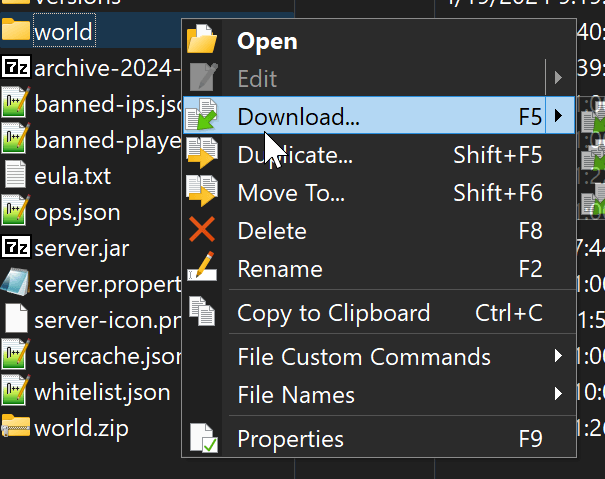
Move your world to your computer. In WinSCP, right-click the world folder and select Download.
Option 2: Download From the Panel
Section titled “Option 2: Download From the Panel”-
Go to the AleForge Panel and select your server.
-
Open File Manager and locate your world folder (see Step 1).
-
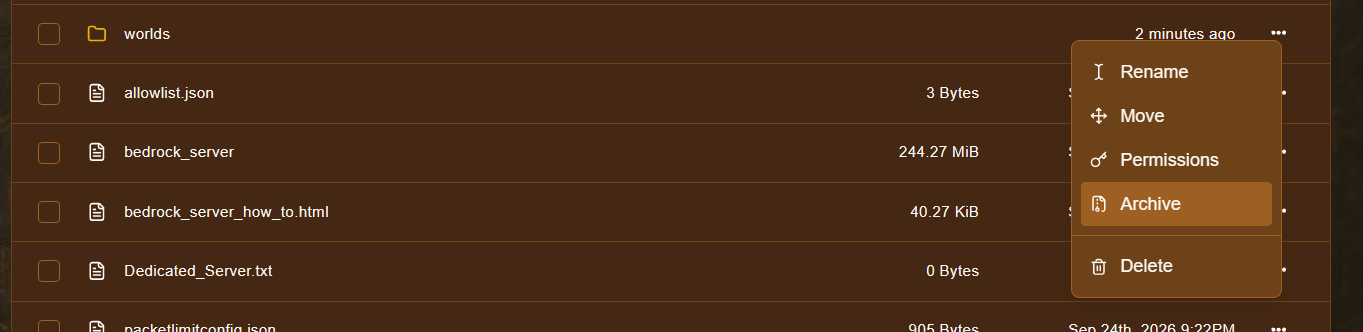
Right-click the world folder.
-
Click Archive.
-
This creates a
.tar.gzfile. Right-click this file and select Download.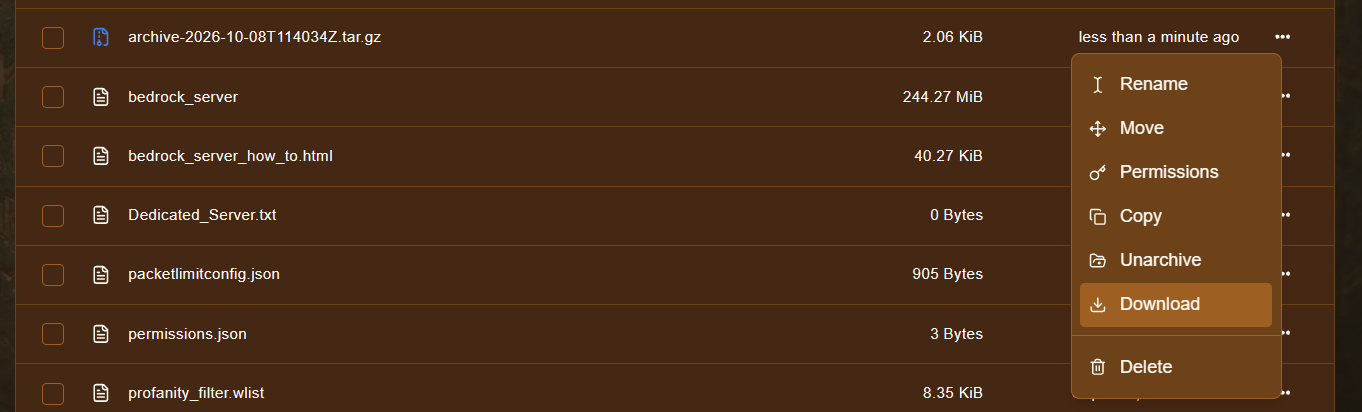
You can open .tar.gz files with a program like 7-Zip.
Step 3: Play Your World in Singleplayer
Section titled “Step 3: Play Your World in Singleplayer”Java Edition
Section titled “Java Edition”-
Make sure the world is extracted into a normal folder. For the panel option, extract the
.tar.gzwith 7-Zip. -
Place the world folder in the
savesfolder of your Minecraft installation. On Windows, it is usually here:%appdata%\.minecraft\saves -
Open Minecraft. The world will appear in your singleplayer world list.
Note: If your server is Paper or Spigot, also download the separate Nether and End folders (for example
world_netherandworld_the_end) if you want those dimensions.
Bedrock Edition
Section titled “Bedrock Edition”Bedrock worlds are opened by turning them into a .mcworld file.
- Make sure the world is extracted into a normal folder. For the panel option, extract the
.tar.gzwith 7-Zip. - Open the world folder and select all the files inside it (not the folder itself). You should see files such as
level.datand adbfolder. - Add those files to a new
.ziparchive. - In File Explorer, tick File name extensions under the View tab.
- Right-click the zip, select Rename, and change
.zipto.mcworld. - Double-click the
.mcworldfile. Minecraft Bedrock will open and import it as a new world.
Tip: The zip must contain the world’s files directly, not a folder holding them. If the world doesn’t import, check this first.
Troubleshooting
Section titled “Troubleshooting”| Problem | What to try |
|---|---|
| Can’t find the world folder | Check the level-name setting in server.properties to see what your world is called. |
Can’t open the .tar.gz file |
Use a program such as 7-Zip. You may need to extract it twice, once for .gz and once for .tar. |
| The download fails or stops | Try again, or use SFTP for large worlds. |
| Java world is missing the Nether or End | Download the separate world_nether and world_the_end folders as well. |
Bedrock .mcworld won’t import |
Make sure the zip has the world’s files at the top level, and that the file ends in .mcworld, not .mcworld.zip. |
| Bedrock world opens as a new, empty world | You may have zipped the wrong folder. Check that you used the world folder from the worlds folder. |