

How to Add Credit for Pay-as-You-Go Servers
Account credit is the centralized balance that your AleForge pay-as-you-go game servers draw from to stay online. You manage and add this credit manually, as there are no preset credit packs to purchase.
Steps to Add Funds
Section titled “Steps to Add Funds”- Log in to the AleForge Client Area.
- Navigate to the Billing section.
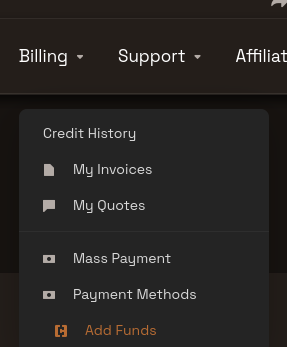
- Select Add Funds to deposit your desired amount.
This single balance is shared automatically by every pay-as-you-go server operating on your account. Please note that standard monthly server subscriptions do not draw from this prepaid balance.
If your game server was suspended due to an empty balance, it will automatically reactivate once your remaining credit rises above $0. This automated restoration usually takes just a few minutes. For more details, see What Happens When My Credit Runs Out.