

Installing Limestone on your Unturned Server
Want to play Limestone with your friends? Since it’s a curated map it will need to be installed through the Steam Workshop. Here’s how to load it onto your Unturned server.
Installing Mods on your Server
Section titled “Installing Mods on your Server”Using Blacksmith’s Portal
Section titled “Using Blacksmith’s Portal”- Open the Blacksmith’s Portal
- Stop your server
- Go to
Files - Navigate to the
WorkshopDownloadConfig.jsonfile. It will be located at/Servers/AleForge_Hosting - Open
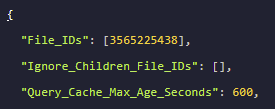
WorkshopDownloadConfig.jsonand add3565225438into the File_IDs array
- Once done, click
Save Content - Now, go to
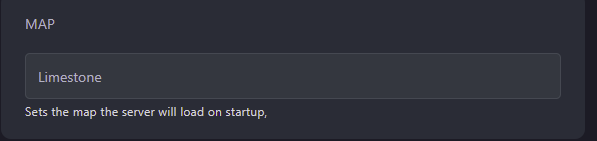
Startupand change the map to Limestone
- Start your server
Self-Hosting/Other Providers
Section titled “Self-Hosting/Other Providers”- Stop your server
- Open the location of your servers’ files
- Navigate to the
WorkshopDownloadConfig.jsonfile. - Open
WorkshopDownloadConfig.jsonand add3565225438into the File_IDs array.
- Once done, click
Save Content - Now, open your
Commands.datand set the map to Limestone. - Start your server