

How do I ban players on my Abiotic Factor server?
Abiotic Factor allows you to ban specific players on your server, preventing them from accessing your server.
Adding an Admin to your server
Section titled “Adding an Admin to your server”Using Blacksmith’s Portal
Section titled “Using Blacksmith’s Portal”- First, you’ll need to get the SteamID of the player you want to ban. You can do this by going to the player’s Steam profile and copying the link. The SteamID will be the long string of numbers at the end of the link

- Next, go to the Blacksmith’s Portal
- Go to
Files - Open
Config Files - Select the
Admin.inifile - Paste the SteamID of the player into one of the
BannedPlayerboxes
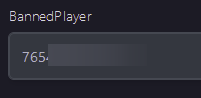
- If you only have one or two banned players you’d like to add, you can add them here. If you’d like to add more than that, select
View Fileand add them on another line - Restart your server, and the set player will be banned
Self-Hosting/Other Providers
Section titled “Self-Hosting/Other Providers”- First, you’ll need to get the SteamID of the player you want to ban. You can do this by going to the player’s Steam profile and copying the link. The SteamID will be the long string of numbers at the end of the link
- Next, go to the install folder of the Abiotic Factor server
- Open
AbioticFactor/Saved/SaveGames/Server/Admin.ini - Look for
Moderator= - Paste the SteamID after this line so it looks like
BannedPlayer=<SteamID> - If you only have one two players you’d like to ban, you can add them here. If you’d like to add more than that, add an additional
BannedPlayer=line - Restart your server, and the set player will be banned.