

How to stay on Project Zomboid Build 41 (legacy41)
Build 42 is now the default stable Project Zomboid release. If you want to keep playing Build 41 (for example for an existing world or B41-only mods), opt into the Steam branch legacy41 (Build 41.78.20) on both your AleForge server and every player’s game client.
Set the AleForge server to legacy41
Section titled “Set the AleForge server to legacy41”- Open the AleForge Panel
- Stop the server
- Create a backup from
Backups - Go to
Startup - Set
Steam Beta Branchtolegacy41 - Go to
Settings→Reinstall Serverand confirm - Start the server once installation finishes
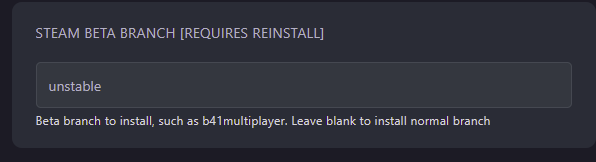
Changing the beta branch only takes effect after a reinstall. Leave Steam Beta Branch blank if you want the default stable Build 42 instead.
Set the Steam game client to legacy41
Section titled “Set the Steam game client to legacy41”Every player who joins must also use Build 41:
- In Steam, right-click Project Zomboid →
Properties - Open
Game Versions & Betas(orBetason older Steam UI) - Under Selected Game Version, choose
legacy41(Build 41.78.20) - Close the window and wait for Steam to download the Build 41 files
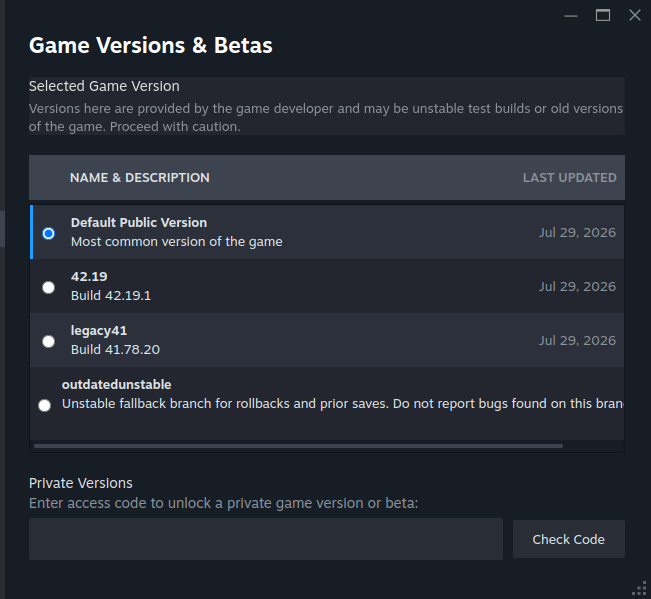
Default Public Version is Build 42 (stable). Use that only when your server is also on Build 42.
Return to Build 42 (stable)
Section titled “Return to Build 42 (stable)”- On the server: clear
Steam Beta Branch(leave blank) →Settings→Reinstall Server - On each client: set Steam back to Default Public Version
- Start the server after the reinstall finishes
Do not reuse a Build 41 world on Build 42 without expecting breakage. Start a new world or restore from a Build 42 backup.