

How do I delete a Prospect on my Icarus server?
If you’re finished playing on an Icarus Prospect, you can delete it from your server to clean up the available options to you when you play Icarus
Deleting a Prospect
Section titled “Deleting a Prospect”Using Blacksmith’s Portal
Section titled “Using Blacksmith’s Portal”- Open the Blacksmith’s Portal
- Stop your server
- Open
Files - Navigate to
/Saved/PlayerData/DedicatedServer/Prospects - You’ll see a list of
.jsonfiles. These are your Prospects. You can open them with the Portal’s built in file editor if you need more information about which.jsonfile is which Prospect.
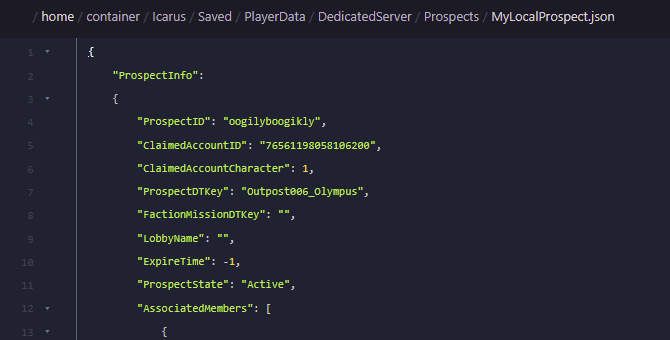
- Delete the
.jsonfiles corresponding with the Prospect you’d like to delete
Self-Hosting/Other Providers
Section titled “Self-Hosting/Other Providers”- Stop your server
- Open the location where your server is installed
- Navigate to
/Saved/PlayerData/DedicatedServer/Prospects - You’ll see a list of
.jsonfiles. These are your Prospects. You can open them with Notepad or a free app like Notepad++ if you need more information about which.jsonfile is which Prospect - Delete the
.jsonfiles corresponding with the Prospect you’d like to delete