

How Do I Change Palworld Server Settings?
Note that some of these settings are currently not implemented and will not do anything if changed.
The new Hardcore options (bHardcore and bPalLost) and Randomizer options require a WorldOption.sav file to be uploaded to home/container/Pal/Saved/SaveGames/0/WorldID.
If Startup settings or admin password stop applying after a world upload, see Palworld Settings or Admin Password Not Applying (WorldOption.sav).
When using a dedicated Palworld server, you must change the server settings
from the Startup section of the panel.
- Go to the AleForge Panel
- Head to the
Startuppage - Find the options in
Startupyou wish to edit and change them to your desired values
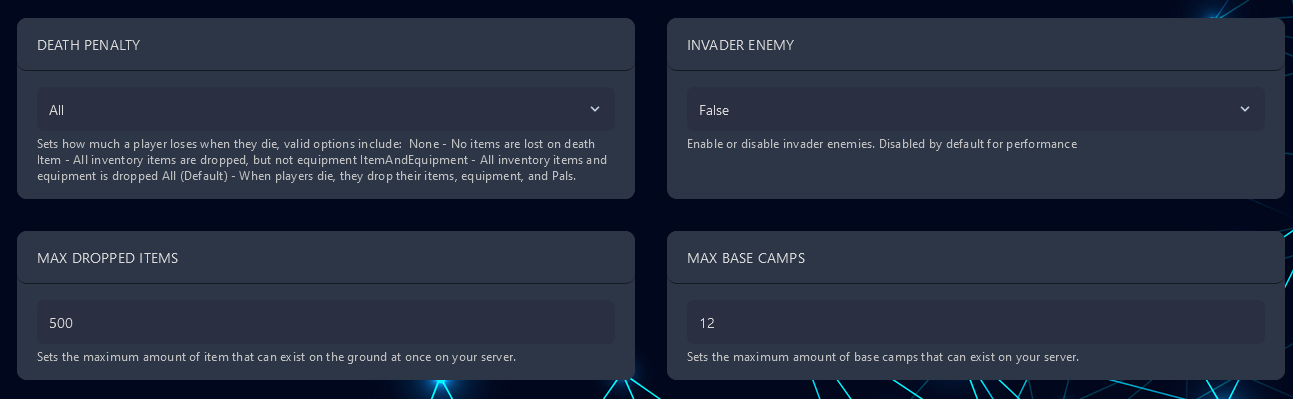
- Once you have set up your server, you can go to
Consoleand restart the server to pick up the changes.
Below are all the options and what they will change. The game is a work in
progress, so not all settings may work. These settings will becrossed
outas we test which ones do and do not work.
| Option | Default Value | Description |
|---|---|---|
| Difficulty | None | Adjusts the overall difficulty of the game |
| Day Time Speed Rate | 1.000000 | Changes how long daytime lasts |
| Night Time Speed Rate | 1.000000 | Changes how long night lasts |
| Experience Rate | 1.000000 | Modifies how much experience you get |
| Pal Capture Rate | 1.000000 | How likely you are to capture Pals |
| Pal Spawn Rate | 1.000000 | How frequently Pals spawn |
| Pal Damage Rate Attack | 1.000000 | How much damage Pals do |
| Pal Damage Rate Defense | 1.000000 | How much damage Pals take |
| Player Damage Rate Attack | 1.000000 | How much damage players do |
| Player Damage Rate Defense | 1.000000 | How much damage players take |
| Player Stomach Decrease Rate | 1.000000 | Rate at which hunger decreases |
| Player Stamina Decrease Rate | 1.000000 | Rate at which stamina decreases |
| Player Auto HP Regen Rate | 1.000000 | How quickly HP will be automatically restored when hurt |
| Player Auto HP Regen Rate While Sleeping | 1.000000 | How much HP is regenerated while sleeping |
| Pal Stomach Decrease Rate | 1.000000 | Rate at which Pal hunger decreases |
| Pal Stamina Decrease Rate | 1.000000 | Rate at which Pal stamina decreases |
| Pal Auto HP Regen Rate | 1.000000 | How quickly Pal HP will be automatically restored when hurt |
| Pal Auto HP Regen Rate While Sleeping | 1.000000 | How much Pal HP is regenerated while sleeping |
| Build Object Damage Rate | 1.000000 | Damage to objects |
| Build Object Deterioration Damage Rate | 1.000000 | How much damage built objects will take over time |
| Collection Drop Rate | 1.000000 | Rate at which items are gathered from things like trees or rocks |
| Collection Object HP Rate | 1.000000 | How much HP breakable world items have |
| Collection Object Respawn Speed Rate | 1.000000 | How quickly obects like trees respawn |
| Enemy Drop Item Rate | 1.000000 | Frequency enemies will drop items |
| Death Penalty | None | Changes what drops on death |
| bEnableAimAssistPad | True | Lets you enable or disable aim assist |
| bEnableAimAssistKeyboard | False | Lets you enable or disable aim assist |
| Drop Item Max Num | 3000 | Max amount of dropped items allowed at one time |
| Base Camp Max Num | 128 | Max amount of bases that can be built at once |
| Base Camp Worker Max Num | 15 | Max amount of worker Pals that can be at a camp |
| Drop Item Alive Max Hours | 1.000000 | How long dropped items will stay spawned before disappearing |
| Auto Disband Guild If No Players Are Online | False | If true, a guild will be disbanded if no players are online |
| Auto Disband Guild If No Players Are Online Time | 72.000000 | How quickly an inactive guild will be disbanded |
| Guild Player Max Num | 20 | Max guild player number |
| Pal Egg Default Hatching Time | 72.000000 | How long it takes to hatch Pal eggs |
| Work Speed Rate | 1.000000 | How quickly Pals work |
| Guild Death Penalty Drop Pickup | False | Whether players can pick up death penalty drops from other players that are not in their guild |
| Non-Login Penalty | True | Whether players should experience penalties for being inactive. |
| Fast Travel | True | Whether players should be able to use fast travel waypoints. |
| Start Location Select By Map | True | Choose whether players should be able to choose their starting location from the map. |
| Coop Max Players | 4 | Max amount of players in a party |
| RandomizerType | None | Changes the randomizer type. Options are None/Region/All |
| RandomizerSeed | Sets a seed for the randomizer | |
| BuildObjectHPRate | 1.0 | Multiplier that changes how much health buildings have |
| bHardcore | False | Enables hardcore mode or permadeath |
| bPalLost | False | Makes your Pals die permanently on death |
| bBuildAreaLimit | False | Adds a limit to the build area |
| ItemWeightRate | 1.0 | Multiplier that sets the item weight rate |
| ChatPostLimitPerMinute | 10 | Sets the maximum number of posts you can send per minute |
| EnablePredatorBossPal | True | Enables predator boss Pals |
| MaxBuildingLimitNum | 0 | Sets a maximum building limit. Leave at 0 to disable |
| ServerReplicatePawnCullDistance | 15000.0 | Sets the maximum distance before pawns will get culled |
| EquipmentDurabilityDamageRate | 1.000000 | Changes the rate at which equipment gets damaged |
| ItemContainerForceMarkDirtyInterval | 1.000000 | How often to force re-sync while a container UI is open (seconds) |
| Physics Active Drop Item Max Num | -1 | Maximum number of dropped items that can use physics behavior. Use -1 for no limit |
| Character Recreate In Hardcore | False | Whether you may recreate your character upon death in Hardcore mode. Has no effect unless Hardcore is enabled |
| Enable Fast Travel Only Base Camp | False | Restrict fast travel to between bases only |
| Allow Client Mod | True | Allow players with mods enabled to join the server |
| Show Join Left Message | True | On dedicated servers, show in-game messages when players join or leave |
| Is Randomizer Pal Level Random | False | If true, wild Pal levels are fully random. If false, levels are randomized within each area’s intended range |
| Player Data Pal Storage Update Check Tick Interval | 1.000000 | Interval (seconds) for checking Pal storage updates on player data |
| Item Corruption Multiplier | 1.000000 | Item corruption speed multiplier |
| Monster Farm Action Speed Rate | 1.000000 | Item production speed multiplier from grazing and monster farms |
| Deny Technology List | (empty) | Disable specific technologies by Technology ID (e.g. “PALBOX”, “RepairBench”) |
| Guild Rejoin Cooldown Minutes | 0 | Minutes a player must wait after leaving a guild before joining another |
| Auto Transfer Master Check Interval Seconds | 3600.000000 | How often the server checks whether to auto-transfer inactive guild leaders (seconds) |
| Auto Transfer Master Threshold Days | 14 | Days of guild master inactivity before leadership is auto-transferred to another member |
| Max Guilds Per Frame | 10 | Maximum number of guilds processed per server frame (performance setting) |
| Block Respawn Time | 5.000000 | Cooldown before you can respawn after death (seconds) |
| Respawn Penalty Duration Threshold | 0.000000 | Survival-time threshold (seconds) for applying the respawn cooldown multiplier on a subsequent death |
| Respawn Penalty Time Scale | 2.000000 | Multiplier applied to the respawn cooldown after rapid deaths |
| Display PvP Item Num On World Map Base Camp | False | Whether to show, on the map, the number of PvP-exclusive items in each base |
| Display PvP Item Num On World Map Player | False | Whether to show player locations and the number of PvP-exclusive items on the map |
| Additional Drop Item When Player Killing In PvP Mode | PlayerDropItem | Item ID dropped when a player is killed in PvP mode (only when bonus PvP drops are enabled) |
| Additional Drop Item Num When Player Killing In PvP Mode | 1 | Quantity of the bonus item dropped on a PvP kill |
| Enable Additional Drop Item When Player Killing In PvP Mode | False | Whether to drop a special item when a player is killed while PvP is enabled |
| Enable Voice Chat | False | Enable in-game voice chat |
| Voice Chat Max Volume Distance | 3000.000000 | Distance at which voice chat volume does not attenuate (centimeters) |
| Voice Chat Zero Volume Distance | 15000.000000 | Distance at which voice chat volume becomes zero (centimeters) |
| Allow Enhance Stat Health | True | Allow allocating stat points to HP at the Statue of Power |
| Allow Enhance Stat Attack | True | Allow allocating stat points to Attack at the Statue of Power |
| Allow Enhance Stat Stamina | True | Allow allocating stat points to Stamina at the Statue of Power |
| Allow Enhance Stat Weight | True | Allow allocating stat points to Carry Weight at the Statue of Power |
| Allow Enhance Stat Work Speed | True | Allow allocating stat points to Work Speed at the Statue of Power |
| Enable Building Player UID Display | False | Whether to display the creator’s player ID on structures |
| Building Name Display Cache TTL Seconds | 60 | How long building name display data is cached (seconds) |
Additional Tips
Section titled “Additional Tips”- Backup Your Configuration File: Before making significant changes, consider creating a backup of your
PalWorldSettings.inifile. This ensures you can revert to the default settings if needed. - Check for Updates: Periodically check for updates to the game or server software, as these updates may introduce new settings or adjustments.
If You Use Another Provider
Section titled “If You Use Another Provider”When using a dedicated Palworld server, you must change the server settings from PalWorldSettings.ini.
- First, open the panel and select your server
- From the console page, stop the server
- Now navigate to the file manager and open the file shown below
Pal/Saved/Config/LinuxServer/PalWorldSettings.ini
- Once opened, put the block of code below, make the desired edits, and Save Content
- Start the server to pick up the changes
[/Script/Pal.PalGameWorldSettings]OptionSettings=(Difficulty=None,RandomizerType=None,RandomizerSeed="",DayTimeSpeedRate=1.000000,NightTimeSpeedRate=1.000000,ExpRate=1.000000,PalCaptureRate=1.000000,PalSpawnNumRate=1.000000,PalDamageRateAttack=1.000000,PalDamageRateDefense=1.000000,PlayerDamageRateAttack=1.000000,PlayerDamageRateDefense=1.000000,PlayerStomachDecreaceRate=1.000000,PlayerStaminaDecreaceRate=1.000000,PlayerAutoHPRegeneRate=1.000000,PlayerAutoHpRegeneRateInSleep=1.000000,PalStomachDecreaceRate=1.000000,PalStaminaDecreaceRate=1.000000,PalAutoHPRegeneRate=1.000000,PalAutoHpRegeneRateInSleep=1.000000,BuildObjectHpRate=1.000000,BuildObjectDamageRate=1.000000,BuildObjectDeteriorationDamageRate=1.000000,CollectionDropRate=1.000000,CollectionObjectHpRate=1.000000,CollectionObjectRespawnSpeedRate=1.000000,EnemyDropItemRate=1.000000,DeathPenalty=All,bEnablePlayerToPlayerDamage=False,bEnableFriendlyFire=False,bEnableInvaderEnemy=True,bActiveUNKO=False,bEnableAimAssistPad=True,bEnableAimAssistKeyboard=False,DropItemMaxNum=3000,DropItemMaxNum_UNKO=100,BaseCampMaxNum=128,BaseCampWorkerMaxNum=15,DropItemAliveMaxHours=1.000000,bAutoResetGuildNoOnlinePlayers=False,AutoResetGuildTimeNoOnlinePlayers=72.000000,GuildPlayerMaxNum=20,BaseCampMaxNumInGuild=4,PalEggDefaultHatchingTime=72.000000,WorkSpeedRate=1.000000,AutoSaveSpan=30.000000,bIsMultiplay=False,bIsPvP=False,bHardcore=False,bPalLost=False,bCanPickupOtherGuildDeathPenaltyDrop=False,bEnableNonLoginPenalty=True,bEnableFastTravel=True,bIsStartLocationSelectByMap=True,bExistPlayerAfterLogout=False,bEnableDefenseOtherGuildPlayer=False,bInvisibleOtherGuildBaseCampAreaFX=False,bBuildAreaLimit=False,ItemWeightRate=1.000000,CoopPlayerMaxNum=4,ServerPlayerMaxNum=32,ServerName="Default Palworld Server",ServerDescription="",AdminPassword="",ServerPassword="",PublicPort=8211,PublicIP="",RCONEnabled=False,RCONPort=25575,Region="",bUseAuth=True,BanListURL="https://api.palworldgame.com/api/banlist.txt",RESTAPIEnabled=False,RESTAPIPort=8212,bShowPlayerList=False,ChatPostLimitPerMinute=10,AllowConnectPlatform=Steam,bIsUseBackupSaveData=True,LogFormatType=Text,SupplyDropSpan=180,EnablePredatorBossPal=True,MaxBuildingLimitNum=0,ServerReplicatePawnCullDistance=15000.000000)