

How to Understand Minecraft Server Logs
Server logs are one of the most essential tools you have for tracking down what is happening on your Minecraft server. Minecraft server logs are basically the way of recording every single activity or event happening in the game, which helps significantly to improve issues that occur daily or maintain players’ interaction and performanceof overall Minecraft servers. In this article, you will learn the essence of practical reading and understanding Minecraft server logs that would give you the power to confidently manage and troubleshoot your server in a more controlled environment.
How to Find the Log Files
Section titled “How to Find the Log Files”- Open your server in the Blacksmith’s Portal
- Select Files and then open the logs folder
- Each file is labeled with the date (year-month-day) for easy reference. When there are multiple files, check the newest log to understand the current situation.
- Click the chosen log file to open it for viewing in File Viewer.
 Showing minecraft log files
Reading the Logs
Section titled “Reading the Logs”Remember that Minecraft server logs are like a treasure trove of information about everything happening on the server. They offer critical insights into the server’s operation and what everyone is up to. Below is a general guide to navigating Minecraft server logs effectively:
Log File Format
Section titled “Log File Format”Minecraft server logs are text files, and each line shows something that happened in the game. Understanding how to read these logs is crucial for comprehending the game’s events.
Timestamps
Section titled “Timestamps”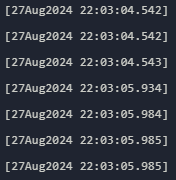 log file time stamps
A timestamp in a log file records the date and time when a specific event occurred. It helps organize and track activities in the log file in chronological order.
Record Terms
Section titled “Record Terms”Terms such as error, fatal, info, debug, and trace are critical indicators in a log file that provide valuable insights into an application or system’s operation and performance.
-
TRACE : These messages reveal the detailed steps of the server’s operation, aiding in identifying and resolving server-related issues.
[main/ERROR] [mixin/]: Mixin config gamemenuremovegfarb-common.mixins.json does not specify “minVersion” property
-
DEBUG : Debug messages provide detailed information about what’s happening inside the server. They are beneficial for finding and fixing any problems or errors.
[Server thread/WARN] [net.minecraft.server.level.ServerLevel/]: Tried to add entity minecraft:spider but it was marked as removed already
-
INFO : This message updates server activities, such as startup, shutdown, and routine tasks.
[Server thread/INFO] [net.minecraft.server.MinecraftServer/]: Saving players
-
FATAL : FATAL messages indicate critical issues that can cause the server to stop working correctly. These issues need to be addressed immediately to prevent any downtime.
-
ERROR : These messages appear when the server has problems that must be checked and fixed.
[main/ERROR] [mixin/]: Mixin config gamemenuremovegfarb-common.mixins.json does not specify “minVersion” property
Event Messages
Section titled “Event Messages”In Minecraft, event messages are like a record of everything that happens in the game world, such as when players do something, change the environment, or when the game itself does something behind the scenes. These messages can help us understand how the game works and how well the servers run.
[Server thread/INFO] [net.minecraft.server.MinecraftServer/]: ThreadedAnvilChunkStorage (world): All chunks are savedRegular Log Monitoring
Section titled “Regular Log Monitoring”Monitoring your Minecraft server logs is not just important; it’s essential. It’s the key to gaining insights into server performance, troubleshooting issues, and ensuring smooth gameplay for all players. By regularly monitoring your logs, you’re taking a proactive step towards a better server experience, and that’s something to be proud of.
Documentation and Resources
Section titled “Documentation and Resources”Using guides and community resources can enhance your understanding and facilitate collaborative problem-solving. Consulting official Minecraft documentation and participating in online communities can offer valuable insights and support for resolving complex issues.
 Image of AleForge Minecraft artcles