

How do I change maps on my ARK: Survival Evolved server?
ARK: Survival Evolved has a number of different maps you can play on. Here’s how you can change between them on your server.
Changing maps on your ARK: Survival Evolved server
Section titled “Changing maps on your ARK: Survival Evolved server”Using the Blacksmith’s Portal
Section titled “Using the Blacksmith’s Portal”- Open the Blacksmith’s Portal
- Go to
Startup - Change the
Server Mapvariable to your desired map
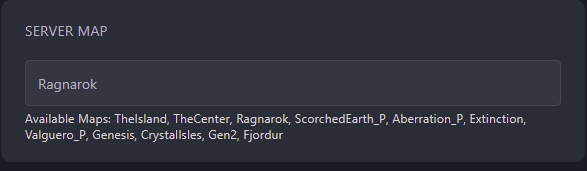
- Restart your server
Self-Hosting/Other Providers
Section titled “Self-Hosting/Other Providers”- Open the the install location of your server
- Open the startup script
- Make sure your desired map is in the launch options of your server’s startup script. e.g.
./ShooterGameServer TheIsland - Restart your server