

How to run network diagnostics for your server
If you are experiencing networking issues like dropped packets, high ping, or random disconnects, you can run network diagnostics to help troubleshoot and narrow down where the problem is happening. These tools trace the path your connection takes between your computer and your server, and show you where along that path delays or packet loss are occurring.
This is one of the most useful things you can do before contacting support, since it often shows whether an issue is happening on your network, your ISP, somewhere in between, or on the server itself. Support may ask you to run some of these commands as part of narrowing down your issue, so it can help to have the results ready in advance.
Leave off the port. For every command below, use only your server’s IP address, not the port. The port is the part after the colon, for example
:12345. Including the port will stop the command from working correctly.
Running tracert
Section titled “Running tracert”tracert (called traceroute on Mac and Linux) shows the exact route a packet takes to get from your computer to your server, listing every “hop,” or network point, along the way, and how long each one takes to respond.
Windows
Section titled “Windows”- Open Command Prompt.
- Type
tracert your-server-ipand press Enter.
Mac and Linux
Section titled “Mac and Linux”- Open Terminal.
- Type
traceroute your-server-ipand press Enter.
This will take a moment to complete, since it has to measure each hop one at a time. If you are working with support, take a screenshot of your full results and send it over, rather than describing them, since the exact hop numbers and timings matter.
Running MTR
Section titled “Running MTR”While tracert only gives you a single snapshot, MTR (My Traceroute) combines a traceroute with an ongoing ping, continuously sending packets along the same route. This makes it much better at catching intermittent problems, like packet loss that only happens occasionally, which a single traceroute could easily miss.
Windows
Section titled “Windows”-
Open WinMTR.
-
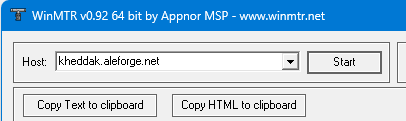
Type the IP of your server into the Host field.
-
Click Start, and let it run until at least 100 packets have been sent.
-
Click Stop, then Copy Text to Clipboard, and send the results to support.
- Install
mtr. The install command varies by distro, so check your distro’s package manager or documentation. - Open the terminal.
- Type
mtr your-server-ipand press Enter. - Let it run for at least 10 seconds, then press
sto pause data collection and take a screenshot of the results.
What to Look For
Section titled “What to Look For”You don’t need to fully understand networking to get useful information from these results. A few general signs to watch for:
- High packet loss (the “Loss%” column in MTR) on one specific hop, and every hop after it, usually points to a problem at that specific point in the route.
- Loss that only appears on the very last hop is often not a real problem; some servers are configured not to respond to these diagnostic packets at all, which can look like loss even when your connection is fine.
- A sudden jump in response time between two hops can point to a slow or congested link at that point, though a single slow hop isn’t always a problem by itself if the hops after it return to normal.
- Consistent results across multiple runs are more reliable than a single test. If you can, run the test two or three times, especially if you are trying to catch an issue that comes and goes.
Sharing Your Results with Support
Section titled “Sharing Your Results with Support”When sending your results to support, include:
- A full screenshot of the output, not a partial one or a typed-out summary
- The approximate time the issue was happening, if it’s intermittent
- Whether the problem happens consistently, or only sometimes
This gives support the clearest picture and helps avoid extra back-and-forth while troubleshooting.