

How do I connect to my SCUM server?
Here’s how you can connect to your SCUM server
SCUM does not support connecting via hostname. If connecting with AleForge, be sure to use 172.65.217.103 as the IP address for your server
Connecting to your server
Section titled “Connecting to your server”Using Blacksmith’s Portal
Section titled “Using Blacksmith’s Portal”- Open the Blacksmith’s Portal
- Take note of the Server IP and port of your server.
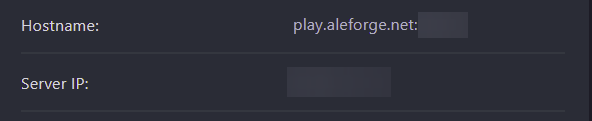
- If you want to connect through the in-game server browser, take note of your servers name from the
Startupsection of the panel. - Open SCUM
Direct Connection
Direct connection will always be the most reliable connection method
- Click
Multiplay
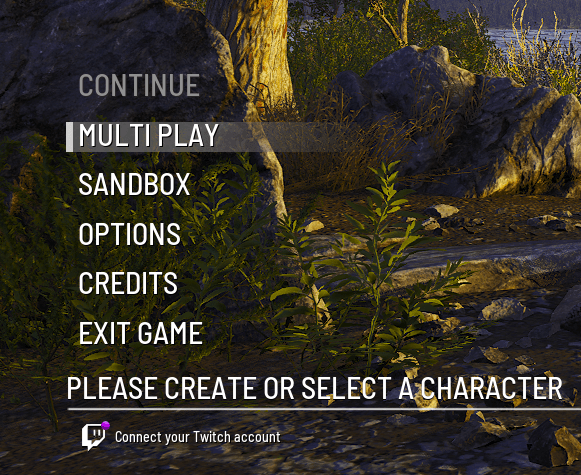
- On the left side of the screen there is an input for an IP address. You’ll want to put the IP address of your server followed by the port + 2. E.g. if your server has the IP address
172.65.217.103:7777, enter172.65.217.103:7779
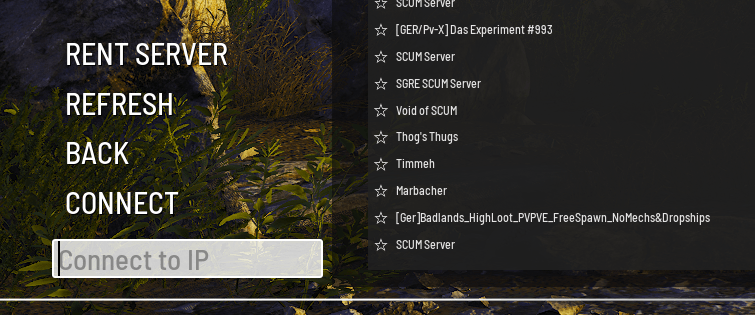
- Press enter. You will now begin connecting to your server
In-Game Server Browser
- Click
Play - Click
Multiplay - Now, search the name of your server in the server browser.
- Once you find your server, click
Join
Self-Hosting/Other Providers
Section titled “Self-Hosting/Other Providers”- Find the IP address of your server. If you’re self hosting you can use a website such as https://www.whatismyip.com/ to discover your IP.
- For the port, you’ll want to use the one you configured to use on your server + 2.
- Open SCUM
Direct Connection
Direct connection will always be the most reliable connection method
- Click
Multiplay
- On the left side of the screen there is an input for an IP address. You’ll want to put the IP address of your server followed by the port + 2. E.g. if your server has the IP address
123.456.789.1:7777, enter123.456.789.1:7779
- Press enter. You will now begin connecting to your server
In-Game Server Browser
- Click
Play - Click
Multiplay - Now, search the name of your server in the server browser.
- Once you find your server, click
Join