

How do I update my Project Zomboid server to Build 42?
Not sure whether to stay on Build 41? See Project Zomboid Build 41 vs Build 42.
Already on Build 42
Section titled “Already on Build 42”If Steam Beta Branch on the Startup page is empty (default), your server is on the current stable Build 42 release. Start the server and let Steam update as usual.
Players should also leave Steam on Default Public Version (no beta selected).
Previously set to unstable
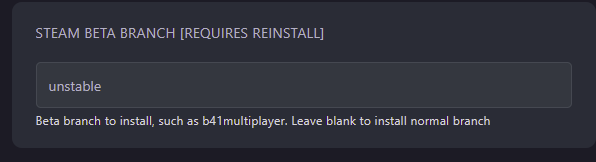
Section titled “Previously set to unstable”If you switched to Build 42 while it was still on the unstable branch, clear that setting so you stay on stable:
- Open the AleForge Panel
- Stop the server
- Create a backup from
Backups - Go to
Startup - Clear
Steam Beta Branch(leave it blank) - Go to
Settings→Reinstall Server - Start the server once installation finishes
Stay on Build 41 instead
Section titled “Stay on Build 41 instead”To keep playing Build 41 (for older saves or mods), use the legacy41 Steam branch on both the server and every player’s game client. See How to stay on Project Zomboid Build 41 (legacy41) or the comparison guide Build 41 vs Build 42.
Important notes
Section titled “Important notes”- Server and clients must be on the same build (Build 42 stable, or Build 41 via
legacy41) - Build 41 and Build 42 worlds are not interchangeable — back up before any branch change
- Prefer mods marked compatible with your current build; older B41-only mods will not work on Build 42