

How do I set permissions for my Return to Moria server?
Moria allows you to set specific permissions for different users on your server, including blocking players from joining. The MoriaServerPermissions.txt file also lists players who have previously connected, making it easy to manage returning members.
To kick a player from the current session without a permanent block, see How do I kick or block players on my Return to Moria server?.
Setting permissions on your Return to Moria server
Section titled “Setting permissions on your Return to Moria server”Using Blacksmith’s Portal
Section titled “Using Blacksmith’s Portal”- Open the Blacksmith’s Portal
- Stop your server
- Go to
Files - Open
MoriaServerPermissions.txt - Scroll down to the bottom and add the player’s name followed by the permissions you’d like them to have. You can also change the default permissions players are given by changing the permissions after
Default =
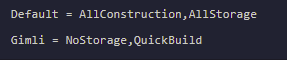
- Save the file
Always stop the server before editing this file to avoid conflicts.
Self-Hosting/Other Providers
Section titled “Self-Hosting/Other Providers”- Ensure your Return to Moria server is stopped
- Open the folder where your server is installed
- Open
MoriaServerPermissions.txt - Scroll down to the bottom and add the player’s name followed by the permissions you’d like them to have. You can also change the default permissions players are given by changing the permissions after
Default =
- Save the file
List of Permissions
Section titled “List of Permissions”| Permission Name | Description |
|---|---|
| Blocked | Prevents the player from joining the server. Use this to ban a player before they connect, or to permanently block someone who has previously joined. |
| Default | Applies the default permission set defined at the top of the file. |
| NoConstruction | Prevents the player from using any build or quick-build functions and from deconstructing any player constructions. |
| QuickBuild | Allows the player to quick-build platforms and rope ladders but prohibits other construction or deconstruction. |
| AllConstruction | Grants full permissions for both construction and deconstruction. |
| NoStorage | Prevents the player from interacting with player-constructed storage containers and from using base storage for crafting. |
| AllStorage | Allows the player to interact with player-constructed storage containers and use base storage for crafting. |