

How to connect to your Conan Exiles Server
Once your Conan Exiles server is running, you can find it in the in-game server browser and join it. This guide shows you how to search for your server by name and what to do if it doesn’t show up.
Before You Begin
Section titled “Before You Begin”- Your Conan Exiles server must be started and finished loading.
- You need access to the AleForge Panel to look up your server name.
- If your server has a password, have it ready.
Step-by-Step Instructions
Section titled “Step-by-Step Instructions”-
From the title screen, click Play Online to open the server browser.
-
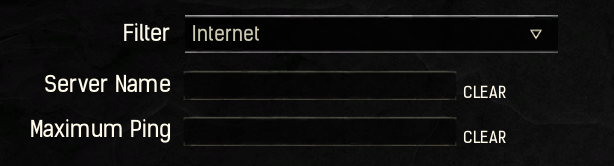
Type the name of your server into the search box.
-
If you don’t know your server name, open the Startup section of the AleForge Panel and copy the server name from there.
-
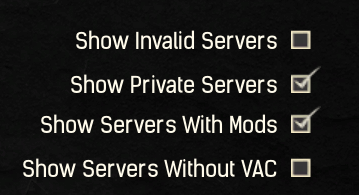
If your server doesn’t appear, check the filter check boxes in the server browser. A checked box can hide your server if it has any of the following:
- Mods installed
- VAC (Valve Anti-Cheat) disabled
- Private access enabled
-
Once your server appears in the list, click it, then press Join at the bottom of the screen.
-
If your server has a password, you will be asked to enter it. Type it in to connect.
Troubleshooting
Section titled “Troubleshooting”| Problem | What to try |
|---|---|
| Server doesn’t appear in the list | Make sure the server is running in the panel, then refresh the server browser. |
| Search finds nothing | Re-check the server name on the Startup page and type it exactly. |
| Server is hidden by a filter | Review the check boxes in the server browser. Mods, VAC disabled, or private servers can be hidden by an active filter. |
| Password prompt keeps failing | Confirm the password on the Startup page and enter it again. |