

How do I install mods onto my ARK: Survival Evolved server?
ARK: Survival Evolved has lots of mods hosted on the Steam Workshop that you can use to customize how your server. Here’s how you can install them.
Installing Mods on your Server
Section titled “Installing Mods on your Server”Using the Blacksmith’s Portal
Section titled “Using the Blacksmith’s Portal”- Go to the Steam Workshop for ARK: Survival Evolved and locate the mods you would like to install
- For each mod you’d like, take note of the workshop ID in the link to the mod

- Open the Blacksmith’s Portal
- Stop your server
- Go to
Startup - Paste your workshop IDs into the
Modsfield. If you are installing multiple mods, be sure that your mod IDs are separated by a comma.
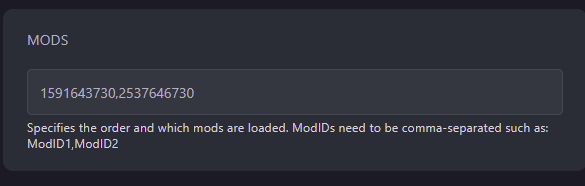
- Restart your server and it will have the appropriate mods installed
Self-Hosting/Other Providers
Section titled “Self-Hosting/Other Providers”- Go to the Steam Workshop for ARK: Survival Evolved and locate the mods you would like to install
- For each mod you’d like, take note of the workshop ID in the link to the mod
- Stop your server
- Open the location of your servers’ files
- Open the startup script you use to start your server
- Add the following line
?GameModIds=<modID>along with-automanagedmods - If you are installing multiple mods, make sure each mod ID is separated by a comma. E.g.
?GameModIds=<mod1ID>,<mod2ID>,<mod3ID> - Restart your server and it will have the appropriate mods installed