

How do I add maps to the map rotation?
You can add any of the maps listed here to your server’s map rotation by following these steps.
- Open to the AleForge Panel
- Go to
Consoleand shut down your server. - Click on the
File Manager - Go to
Modules/Native/tdm_config.txt - For each map you want to put into the map rotation, add
add_map_to_automated_battle_pool <mapname>below theGameTypevariable
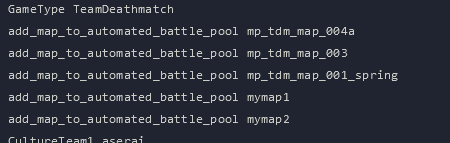
- Click
Save Content - Go back to
Consoleand start your server. These additional maps will be rotated in and out.