

How To Set Up A Whitelist / Make Your Server Private
How to Set Up a Whitelist on Your Minecraft Server
Section titled “How to Set Up a Whitelist on Your Minecraft Server”A whitelist is your primary means of preventing unauthorized entry into your server. Any official Minecraft usernames you put on the list will be allowed to enter your server, while anyone not on it will be denied access. This guide shows you how to turn the whitelist on and how to manage the players on it.
Before You Begin
Section titled “Before You Begin”- Access to the AleForge Panel
- The exact Minecraft username of every player you want to allow
Activating the Whitelist
Section titled “Activating the Whitelist”-
Log in to your AleForge Panel and select your server.
-
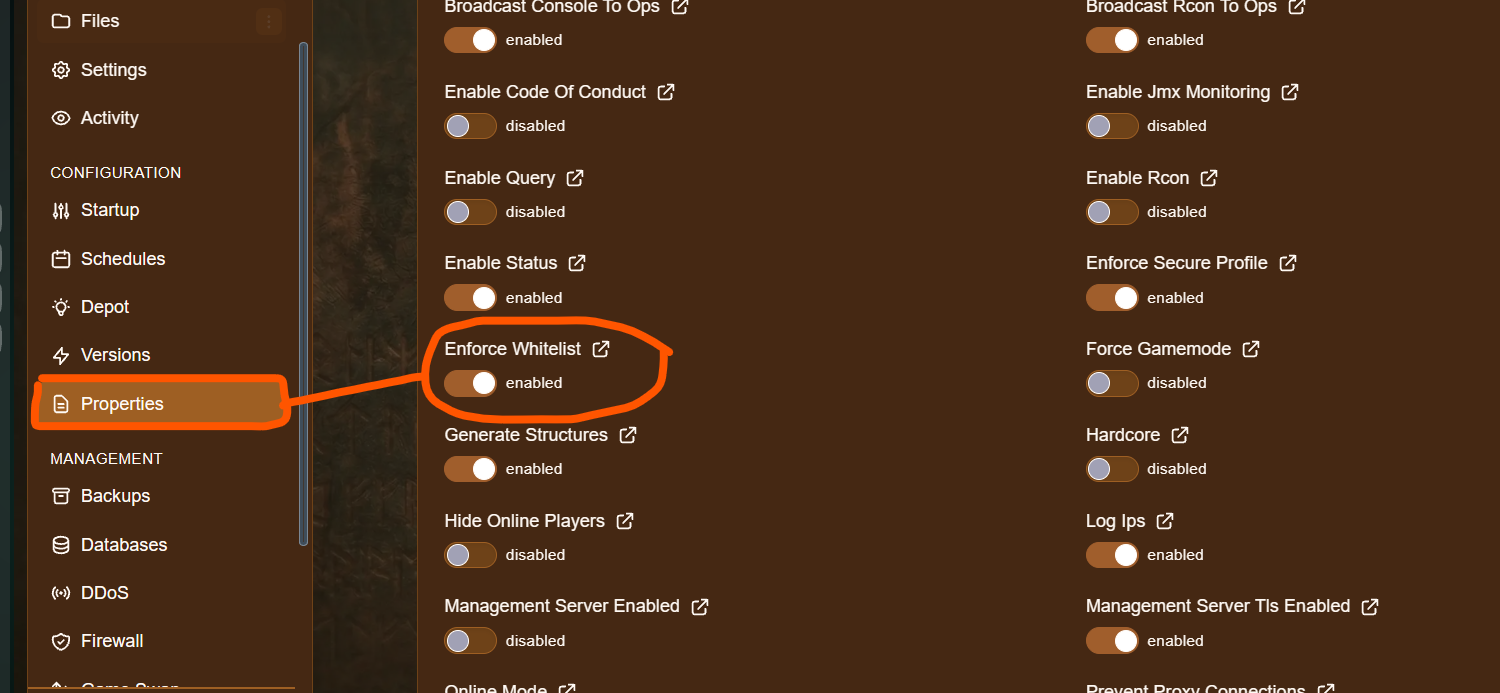
Click Server Properties.
-
Look for ENFORCE-WHITELIST and enable it.
-
Be sure to click Save near the top of the page after you change this setting.
Note: In Minecraft’s
server.properties,white-listturns the whitelist on, andenforce-whitelistremoves players who aren’t on the list when the whitelist changes. If your whitelist isn’t blocking players, make sure the whitelist is turned on using the console commands below.
Turning the Whitelist On or Off From the Console
Section titled “Turning the Whitelist On or Off From the Console”With some versions of Minecraft, you can also use these commands in the console to control whitelisting:
| Command | Description |
|---|---|
whitelist on |
Turns the whitelist on. |
whitelist off |
Turns the whitelist off. |
Adding Users to the Whitelist
Section titled “Adding Users to the Whitelist”You can add a user from the console or from inside the game.
From the Console
Section titled “From the Console”-
Click Console in the navigation menu of the game panel.
-
Type the following command and press Enter:
whitelist add username
From In-Game
Section titled “From In-Game”To add a user in-game, use the same format with a / at the start. You need to be an operator to do this.
/whitelist add usernameReplace
usernamewith the player’s exact Minecraft username.
Removing Users and Checking the List
Section titled “Removing Users and Checking the List”| Command | Description |
|---|---|
whitelist add username |
Adds a player to the whitelist. |
whitelist remove username |
Removes a player from the whitelist. |
whitelist list |
Shows everyone currently on the whitelist. |
whitelist reload |
Reloads the whitelist from file, for example after editing it by hand. |
Troubleshooting
Section titled “Troubleshooting”| Problem | What to try |
|---|---|
| Players can still join without being on the list | Make sure the whitelist is turned on with whitelist on, and that your settings are saved. Restart the server if needed. |
| A player on the list can’t join | Check that their username was entered exactly as it appears in Minecraft. Remove the entry and add it again. |
| Command doesn’t work in-game | Make sure you are an operator and that the command starts with /. |
| Setting didn’t apply | Make sure you clicked Save in Server Properties, then restart the server. |