

How to create a subdomain for your server
Subdomains are a useful feature for your server. Normally, if your server ever gets moved onto a different node, its IP address changes, and everyone would need to update the address they use to connect. A subdomain fixes this: once it’s set up, you and your players can always connect using the same address, even if the underlying IP changes behind the scenes. Here’s how to create one.
Games with a separate port field, like Terraria: a subdomain only replaces the IP address, not the port. If your server moves to a new node, you’ll still need to update the port separately for these games, even after your subdomain is set up.
Creating a Subdomain
Section titled “Creating a Subdomain”-
Go to the AleForge Panel.
-
Open your server and go to Subdomain.
-
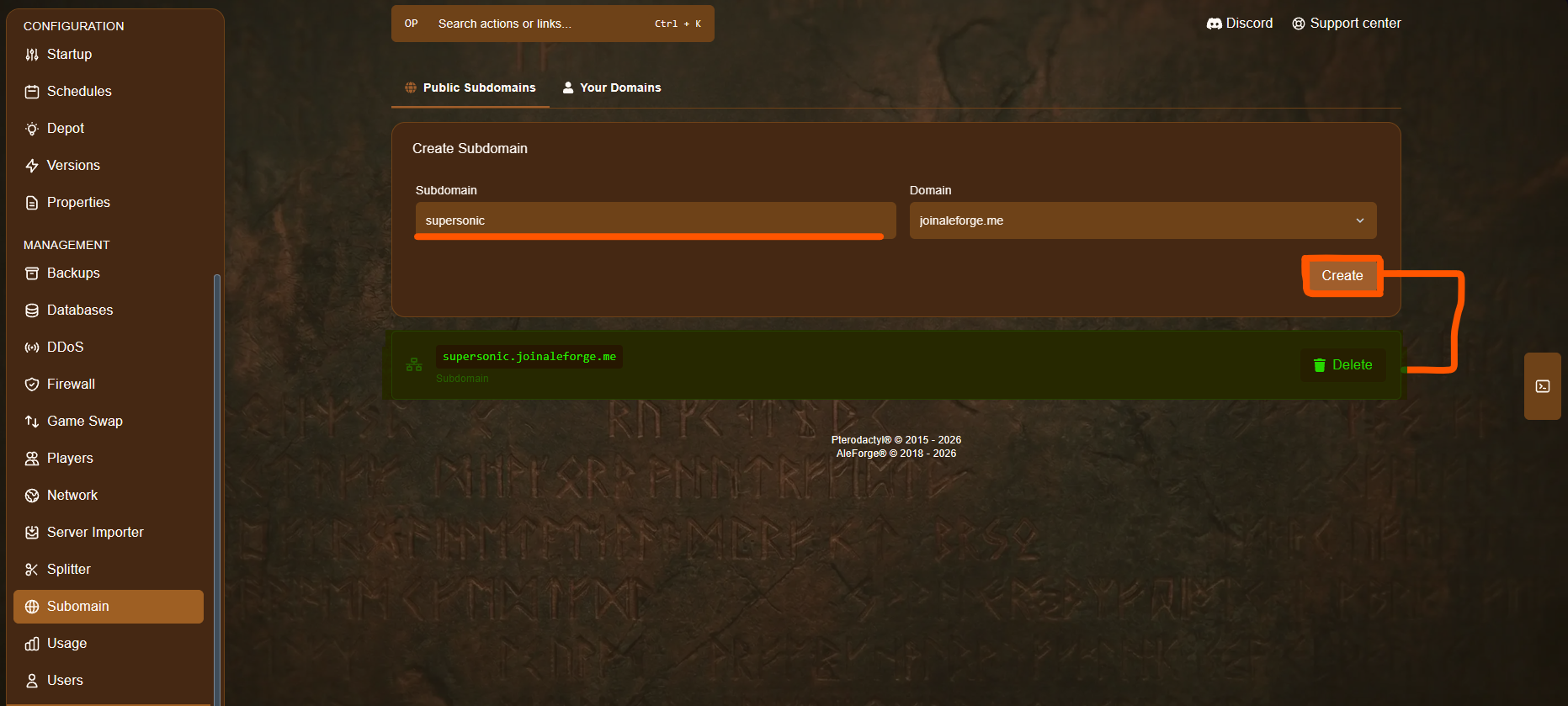
Enter the name you’d like to use for your subdomain. If it’s already taken, you’ll need to choose a different one.
-
Click Create.
That’s it, your subdomain is live. You and your players can now connect using that subdomain instead of your server’s IP address. For example, if you created the subdomain supersonic, you would connect using:
supersonic.joinaleforge.meIf Your Server Moves to a New Node
Section titled “If Your Server Moves to a New Node”If your server is ever moved onto a different node, its IP address will change, but your subdomain won’t follow automatically. You’ll need to recreate the subdomain, using the exact same name, to re-point it at your new node’s IP address.
This is a one-time step done from the Panel, and only you need to do it. Your players don’t need to change anything on their end, they can keep using the same subdomain address as always.