

How to Set Yourself as Admin in Project Zomboid
It is a good idea to have a couple of admins on your server. This gives you access to several commands that are useful for banning/kicking problematic players. This guide will walk you through setting your player as an Admin on your Project Zomboid server.
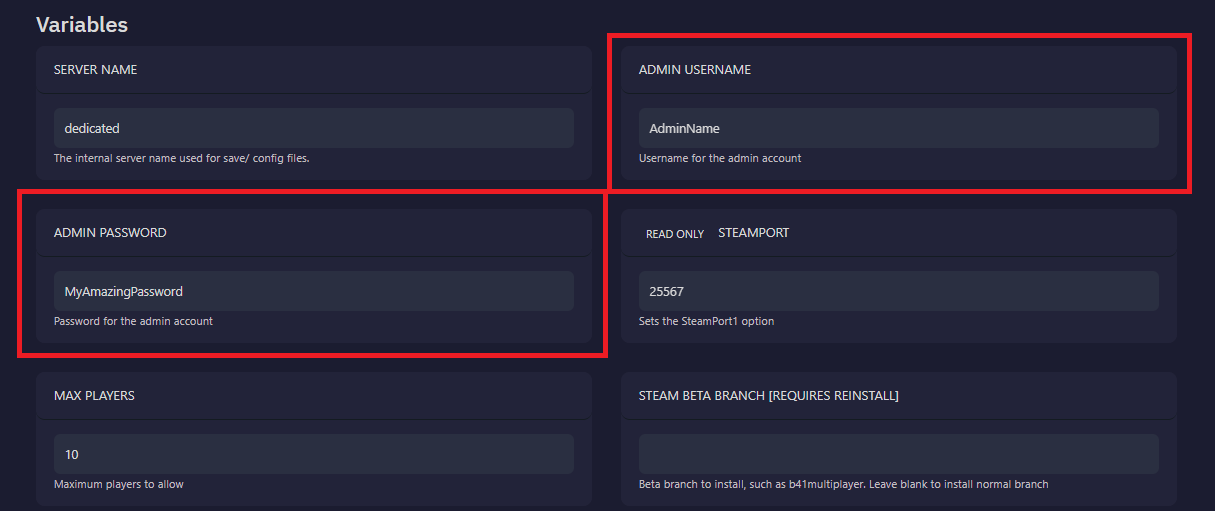
Set The Server Admin Password
Section titled “Set The Server Admin Password”- Open the
Startuppage of your server - Change the
Admin Usernameto whatever you wish - Set the
Admin Passwordto a secure password - Restart the server to pick up the change
How to Log In as an Admin on Your Project Zomboid Server
Section titled “How to Log In as an Admin on Your Project Zomboid Server”- Open Project Zomboid
- Click
Joinfrom the main menu - Where you usually enter your server account username, enter your
Admin Username - In the Account, Password field, enter the
Admin Passwordyou set earlier - Connect to the server using your admin credentials
Now you will have admin access in-game. You can look for the red Admin text next to your nametag to confirm this worked.
Common Issues
Section titled “Common Issues”I am not listed as admin:
This usually means that the admin username was typed in incorrectly.
- Double check the username matches the exact name you typed on the Startup page
- Restart the server to make sure the password change is loaded on your server
Wrong username or password:
When you see this error, it means either the admin username or password was incorrect
- Double check the username matches the exact name you typed on the Startup page
- Re-enter the password to confirm it is typed correctly
- Restart the server to make sure the password change is loaded on your server