

How to connect to your Aloft server
Aloft uses a room code system to connect to your server, which differs from the normal way of connecting to your server with IP and port. Here’s how you can connect to your server.
Connecting To Your Server
Section titled “Connecting To Your Server”Using AleForge’s Blacksmith’s Portal
Section titled “Using AleForge’s Blacksmith’s Portal”- Go to the Blacksmith’s Portal
- Start your server
- Open the
Consoletab - Look for the 6-digit room code in the console
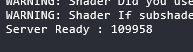 In this example, the room code is 109958
- Launch Aloft
- Click Multiplayer
- Enter the 6 digit room code
You will begin connecting to your server!
Self-hosting/Other Providers
Section titled “Self-hosting/Other Providers”- Go to the directory where your Aloft server is installed
- Start your server
- Look for the 6-digit room code in the console
- Launch Aloft
- Click Multiplayer
- Enter the 6 digit room code
You will begin connecting to your server!