

How do I configure my Abiotic Factor server?
Abiotic Factor has a number of configurations available that let you customize your experience exactly how you’d like it. Here’s how you can change many of the settings that impact how the game plays
Configuring your server using the Blacksmith’s Portal
Section titled “Configuring your server using the Blacksmith’s Portal”- Go to the Blacksmith’s Portal
- Stop your server
- Go to the
Files - Open
Config Files

- Open the SandboxSettings.ini file and change your desired values
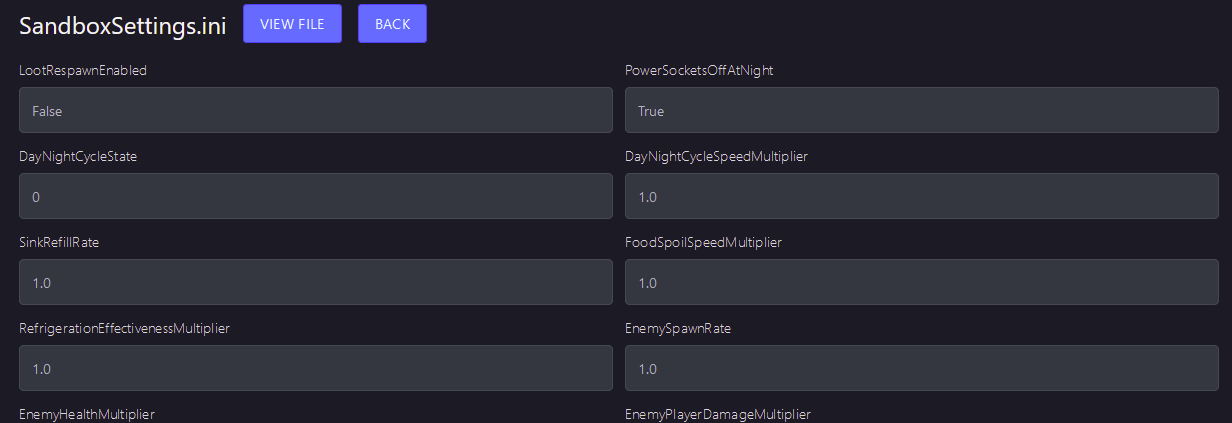
- Be sure to hit the
Savebutton in the bottom right when you are done modifying your file - Start your server
Configuring your server manually or on another host
Section titled “Configuring your server manually or on another host”- Stop your server
- Go to the folder where your Abiotic Factor server is installed
- Navigate to
AbioticFactor/Saved/SaveGames/Server/Worlds/Cascade/ - Open
SandboxSettings.ini - Change your desired values
- Be sure to save once you have changed all desired values
- Start your server
What do the options mean?
Section titled “What do the options mean?”| Variable | Value | Description |
|---|---|---|
| LootRespawnEnabled | True or False | If true, resources will spontaneously respawn around the Facility |
| PowerSocketsOffAtNight | True or False | By default, power in the Facility is shut off at night, including power sockets |
| DayNightCycleState | 0 or 1 | This setting will allow you to disable the Day Night Cycle |
| DayNightCycleSpeedMultiplier | Any number | Speed multiplier for the Day and Night cycle |
| SinkRefillRate | Any number | In the world, sinks will passively refill over time, allowing players to drink from them |
| FoodSpoilSpeedMultiplier | Any number | This value determines how fast food spoils |
| RefrigerationEffectivenessMultiplier | Any number | This value determines how effective it is to refrigerate items |
| EnemySpawnRate | Any number | This value determines how frequently enemies respawn |
| EnemyHealthMultiplier | Any number | This is a multiplier of enemy health |
| EnemyPlayerDamageMultiplier | Any number | This value will determine how damaging enemies are, as a multiplier of their damage |
| EnemyDeployableDamageMultiplier | Any number | This value will determine how much damage enemies do to deployables, as a multiplier of their damage |
| DamageToAlliesMultiplier | Any number | This value will determine how much damage players do to other players, as a proportion of normal damage |
| HungerSpeedMultiplier | Any number | This value is a multiplier and determines how fast Hunger increases |
| ThirstSpeedMultiplier | Any number | This value is a multiplier and determines how fast Thirst increases |
| FatigueSpeedMultiplier | Any number | This value is a multiplier and determines how fast Fatigue increases |
| ContinenceSpeedMultiplier | Any number | This value is a multiplier and determines how fast Continence drains |
| DetectionSpeedMultiplier | Any number | This multiplier will determine how fast enemies detect players |
| PlayerXPGainMultiplier | Any number | This value is a multiplier and determines how fast XP is gained by players |
| ItemStackSizeMultiplier | Any number | This is a multiplier of how many times you can stack items in an inventory slot |
| ItemWeightMultiplier | Any number | This is a multiplier affecting how heavy items are in your inventory |
| ItemDurabilityMultiplier | Any number | This is a multiplier for item durability |
| DurabilityLossOnDeathMultiplier | Any number | This value will determine how much durability is lost on weapons and items in the player’s inventory when respawning |
| ShowDeathMessages | True/False | If false, players will not be notified when someone is killed by something |
| AllowRecipeSharing | True/False | If false, this will disable the ability to share item recipes with other players |
| AllowPagers | True/False | If false, Pagers will not be useable in inventory or via the emote wheel |
| AllowTransmog | True/False | If false, players will be unable to transmogrify their armor to look like other pieces of armor using a certain piece of base equipment |
| DisableResearchMinigame | True/False | If true, this will remove the Research Minigames when unlocking new recipes and simply unlock the recipe right away |
| DeathPenalties | 1 through 3 | This will determine what penalties the player receives for respawning after death (or by using the Unstick option |
| GlobalRecipeUnlocks | True/False | When true, all players will share the same recipe list instead of unlocking recipes individually |